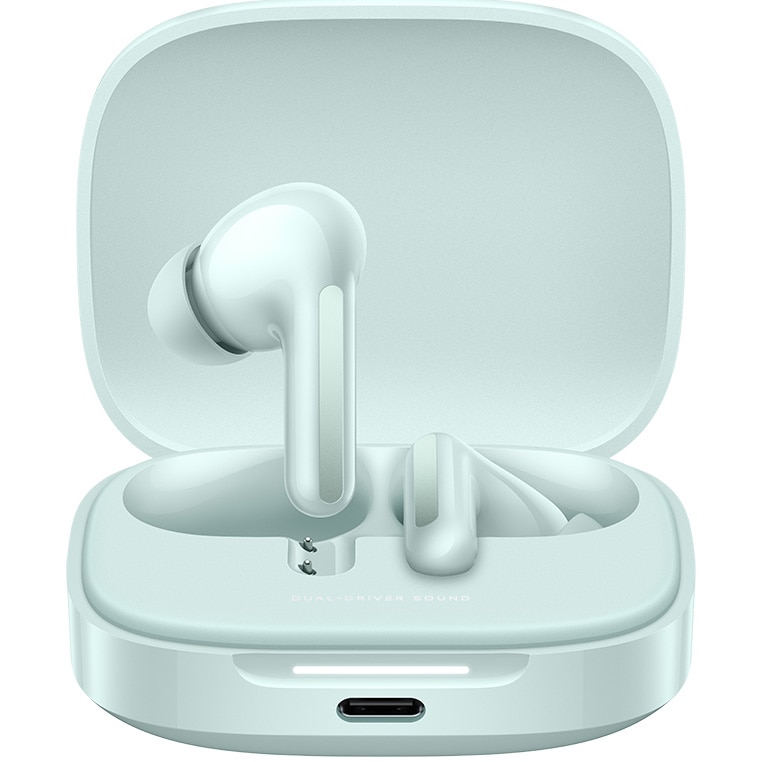
In-Ear Headphones Redmi Buds 6, Wireless, Bluetooth 5.4, ANC, Autonomy 42 hours, IP54, Coral Green
 (100 in stock)
187.55 RON
Redmi Buds 6 In-Ear Headphones, Wireless, Bluetooth 5.4, ANC, 42-hour battery life, IP54, Coral Green Comfortable in-ear noise cancellation: The headphones can adjust the degree of noise cancellation in real time, depending on the current wearing conditions, balancing the ear pressure to combine comfort and reduce noise. Sound quality: Features AAC codec for lossless audio transmission. Spatial audio: Enjoy immersive sound on devices with spatial sound. Call noise cancellation: Each earphone has two built-in microphones with support for the ENC algorithm for AI wind noise reduction during calls. Extended battery life: Provides 10 hours of playback per charge and up to 42 hours with the charging case. A 10-minute charge supports 4 hours of playback. *Battery endurance tests are based on music playback with Bluetooth AAC connection, volume 50%, noise cancellation off and other settings in default mode. Data comes from Xiaomi laboratories, actual battery endurance will vary slightly depending on the environment, software version and device model. Earphone recording: Recording while using the earphone is not supported. Additional features: Includes seamless audio switching between devices, features IP54 dust and water resistance standard and personalized settings via Xiaomi Earbuds app. Bluetooth connection Redmi Buds 6 uses Bluetooth 5.4 technology. Battery level indicator light For Redmi Buds 6, the charging case has only one white light strip, with different lighting effects for different scenarios. Power on (USB connected): The indicator strip gradually lights up from left to right (one cycle). Charging: The indicator strip continuously cycles from left to right (constant lighting). Fully charged: the light strip stays on continuously. Connection status: After opening the cover, press and hold the function button for 2 seconds, and the indicator will enter a slow flashing white state (1 flash per second) until it successfully connects to the phone. When the pairing is successful, the white light will stay on for 5 seconds. If there is no connection for 1 minute, the headphones will enter sleep mode and the indicator will turn off. Case detection light effect: After the headphones are placed in the case, the indicator will stay on for 2 seconds before turning off. Battery check: The white indicator strip on the charging case can display the battery level in the case. Long battery life With active noise cancellation (ANC) disabled, the earbuds can provide up to 10 hours of playtime on a single charge and up to 42 hours when used with the charging case. Redmi Buds 6 supports replacing a single earbud or reconfiguring the left and right earbuds. The steps are as follows: After replacing a single earbud, place both earbuds in the charging case and close the lid. Open the lid and while keeping the earbuds in the case, press and hold the function button on the charging case for 20 seconds. The earbuds will automatically reconfigure and connect to each other. IP54 resistance standard The earbuds have the IP54 waterproof standard for dust and water resistance, while the charging case does not have this feature. Redmi Buds 6 are designed with an IP54 standard, which protects against water droplets from all directions. They can work during intense workouts (such as gym sessions) or light rain while walking or cycling. It is recommended to wipe the headphones after sweating. Noise Cancellation The headphones have an in-ear design, and under normal use conditions, active noise cancellation (ANC) reaches up to 49dB. The effectiveness of in-ear noise cancellation will vary depending on the shape and size of the wearer's ear canal, how tightly the headphones are worn, and the wearing angle. Touch Control The headphones use a touch method to control functions. After wearing the headphones correctly, apply a slight force to touch the flat area on the top of the earpiece stem. You will hear a sound indicating the button is working, and you can follow the instructions in the user manual for various functions. If there is no response after tapping, try adjusting the fit of the headphones or repositioning them. The default functions for the touch control area of the headphones are as follows: 1. Double tap to answer/end calls. Triple tap to reject calls. 2. Double tap to play/pause music. Triple tap to play next track. 3. Press and hold for 2 seconds to switch between Transparency, Noise Canceling and Off modes. Long range In an unobstructed environment, the effective connection range between the headphones and the phone is approximately 10 meters. If there are walls or other obstacles, the effective range will be reduced. For example, in a house with multiple walls, keeping your phone in the living room and moving your headphones to the bedroom can cause Bluetooth lag or disconnection. Redmi Buds 6 features ENC call noise cancellation and ANC technology. Both ENC and ANC aim to suppress environmental noise, however, the benefiting parties are different. ENC (Environmental Noise Cancellation) optimizes audio signal processing algorithms to introduce additional processing steps between audio input and output. This reduces the impact of ambient noise on audio quality, improving call quality and audio clarity. The effectiveness of noise cancellation requires acoustic validation. ANC (Active Noise Control) works by using microphones to collect external noise, then systematically transforms it into an inverted sound wave that is added to the output. The final sound that comes to the human ear is ambient noise + inverted ambient noise. The overlap of these two noises results in a perceived reduction in noise, which benefits you. In turn, CVC noise cancellation benefits the other caller.
Quantity
Related Products